

A deep dive into LeadDyno’s one-click integrations for Shopify, WooCommerce, Stripe, and other major platforms.
So, you’re considering LeadDyno for your affiliate program. You know it’s a popular, easy-to-use tool, but you have one critical question: Will it actually work with my store?
A powerful affiliate platform is useless if it doesn’t integrate seamlessly with your e-commerce cart. In this guide, we’re doing a detailed breakdown of LeadDyno’s specific e-commerce integration features to help you decide if it’s the right fit for your tech stack.
What is LeadDyno? (A Quick Refresher)
LeadDyno is a cloud-based affiliate tracking software designed to be as user-friendly as possible. Its main selling point is simplicity. It aims to help merchants (especially on platforms like Shopify) get a complete affiliate program up and running in minutes, not days.
It’s known for its clean affiliate dashboard and built-in marketing tools, like one-click social media sharing for your affiliates.
Key E-commerce Integration Features
LeadDyno’s strength is its “one-click” setup with major platforms. Let’s break down the most important ones.
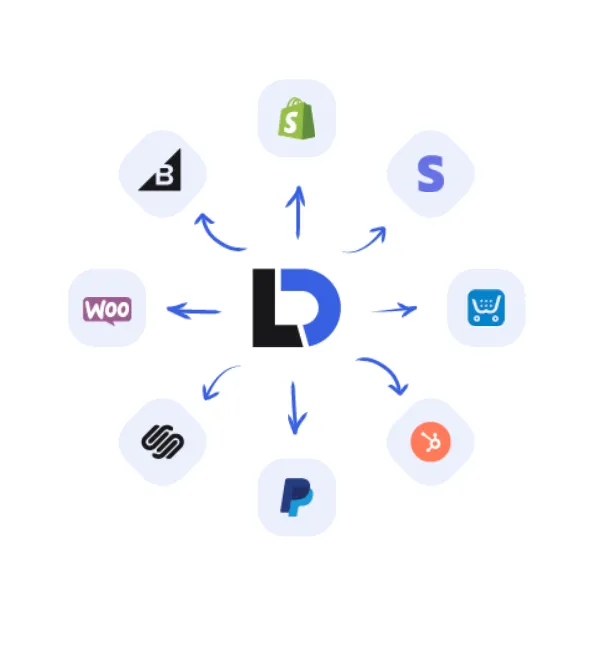
One-Click Shopify Integration
This is LeadDyno’s flagship integration. It’s available on the Shopify App Store and provides a true one-click install.
- How it works: You install the app, and LeadDyno automatically connects to your store.
- Tracking: It automatically places its tracking code, monitors sales, and handles commissions.
- Coupons: It can automatically generate affiliate-specific coupon codes.
- Refunds: It syncs with Shopify’s refund system, so if you refund an order, the affiliate’s commission is automatically canceled.
WooCommerce & WordPress Plugin
For the millions of stores built on WordPress, LeadDyno offers a dedicated plugin.
- How it works: You install the “LeadDyno” plugin from the WordPress repository.
- Setup: After installing, you enter your LeadDyno public and private keys to sync your store.
- Features: It fully supports tracking for WooCommerce sales, manages recurring commissions for subscription plugins, and tracks leads from contact forms.
Stripe & Subscription Payments
This is crucial for SaaS and subscription box businesses. LeadDyno has a deep integration with Stripe.
- How it works: It connects directly to your Stripe account.
- Recurring Commissions: This is the key feature. When a customer pays their monthly subscription via Stripe, LeadDyno sees it and automatically generates the recurring commission for the referring affiliate, every single month.
- Platforms: This also works for carts that use Stripe as their payment processor, like Squarespace or MemberPress.
Other Major Platform Integrations
LeadDyno also has pre-built integrations for most other major platforms, including:
- BigCommerce
- Squarespace
- Wix
- Ecwid
- PayPal
Beyond Integrations: Core Features for E-commerce
A good integration is just the start. Here are the features that make LeadDyno effective for e-commerce merchants aftersetup.
Automated Affiliate Communication
LeadDyno comes with a pre-built email automation system. You can set up emails to automatically:
- Welcome a new affiliate when they sign up.
- Notify an affiliate the moment they make a sale.
- Send weekly updates with their traffic and commission stats.
This “hands-off” communication keeps your affiliates engaged and motivated without any manual work from you.
One-Click Social Media Sharing
This is one of LeadDyno’s best features. Inside their affiliate dashboard, your partners will find pre-written social media posts (that you create) with their unique affiliate link already embedded. They can share to Facebook, Twitter, and other platforms with a single click.
Affiliate Payouts (PayPal, Coinbase)
LeadDyno makes it easy to pay your affiliates. It supports one-click mass payouts via PayPal, as well as Dwolla and even Coinbase for crypto payments.
Platform Pricing (2025)
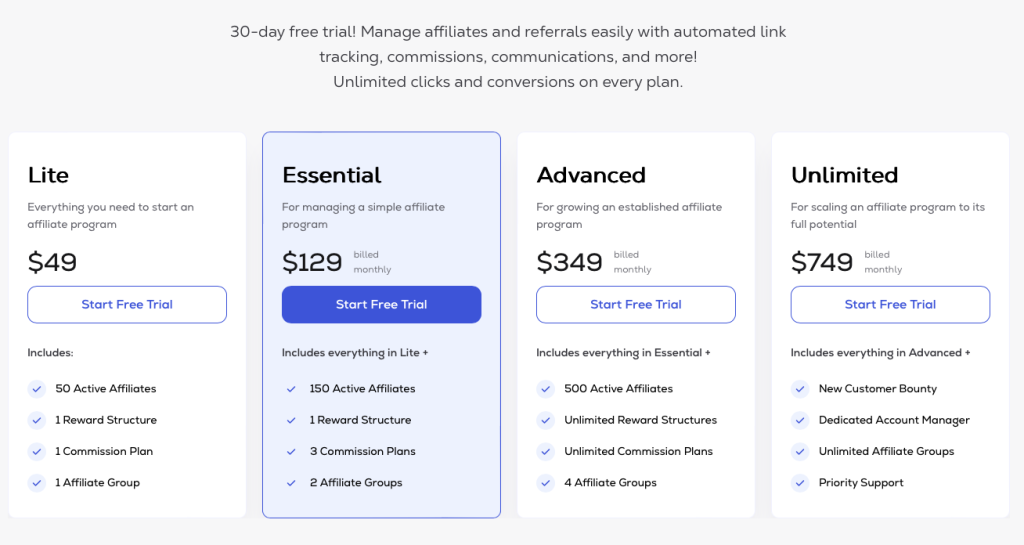
A key part of LeadDyno’s appeal is its simple, entry-level pricing. As of 2025, their cloud-hosted plans start at $49/monthfor the “Lite” plan, which typically includes up to 50 active affiliates.
Higher tiers (like “Essential” at ~$129/mo and “Advanced” at ~$349/mo) increase the number of active affiliates you can have.
However, the most critical factor to be aware of—which we detailed in our Post Affiliate Pro vs. LeadDyno showdown—is the risk of overage fees based on your total website visitors, not just your affiliate sales. While the base plans are affordable, it’s essential to monitor your traffic to avoid unexpected, high costs.
Is LeadDyno the Best Choice for You?
LeadDyno‘s integrations are fast, simple, and reliable, especially for Shopify and Stripe. It’s perfect for the business owner who wants an “all-in-one” solution that is easy to manage.
However, its simplicity can also be a limitation.
- It lacks the deep, granular commission rules of more advanced systems (like 10-tier MLM or complex performance bonuses).
- Its pricing model, which can be tied to your total website visitors (not just affiliate sales), can become expensive as your site grows.
If you are a beginner or a small-to-medium Shopify store, LeadDyno’s e-commerce integrations are excellent. If you are a power user who needs complex commission rules, you may be better served by a more advanced tool. As we cover in our Post Affiliate Pro vs. LeadDyno showdown, choosing the right tool depends entirely on your business goals.
Frequently Asked Questions (FAQ)
- Q: Does LeadDyno work with Shopify?
- A: Yes, it has an official, one-click app in the Shopify App Store. It’s one of its best integrations.
- Q: Can LeadDyno handle recurring subscriptions?
- A: Yes, it integrates directly with Stripe (and other subscription tools) to automatically track and pay recurring commissions for the life of the customer.
- Q: Is LeadDyno hard to set up?
- A: No, its main selling point is its simplicity. The one-click integrations for platforms like Shopify and the WordPress plugin make setup very easy for non-technical users.
- Q: Is LeadDyno a WordPress plugin?
- A: LeadDyno is a cloud-based service, but it uses a free WordPress plugin to connect your WooCommerce store to its cloud service.
Ready to see how it works with your store?
Start Your 30-Day Free Trial Today
Affiliate Disclosure: This article contains affiliate links. We may receive a commission for purchases made through these links at no extra cost to you.
Disclaimer: The visuals used in this article are AI-generated for illustrative purposes only. They are not screenshots of the actual product and may not represent its exact appearance.
 English